

A global fitness app with 5,000+ recurring customers was suffering from failing modules, broken wearable sync and an overloaded server. BSP Technologies ran a full technical audit and fixed the core features. It then traced the server load to 25 cron jobs running every minute. After 48 hours of focused work, idle CPU usage fell from 45–60% to around 5%.
When fast-growing digital products begin to scale, issues that look small on the surface often reveal deeper architectural cracks underneath.
That is exactly what happened when a global fitness brand serving more than 5,000 recurring customers across multiple countries approached BSP Technologies. The product had real strengths:
- a polished mobile app
- a supporting web admin panel
- a rapidly growing subscriber base
- global expansion already under way
Behind the scenes, however, the internal systems were unreliable, inconsistent and struggling under hidden load. This case study explains how our engineering team diagnosed the problems, fixed the core features, and found the real cause of the server failures. It also covers what the results mean for any growing app.
The Challenge: A Growing App With Unstable Foundations
Before approaching BSP Technologies, the brand had worked with a previous development team. Over time, the product began showing serious issues:
- 01Critical modules were failing frequently. Leaderboards, session tracking, metrics, rewards and daily activity sync were all unstable.
- 02Subscription tracking was inaccurate. With thousands of recurring customers, even minor misalignment caused revenue confusion.
- 03Onboarding broke depending on the sales channel. Each partner or funnel sent data in a different format, creating inconsistent user journeys.
- 04Session recordings were still entered manually. This created operational drag and human error, with no validation.
- 05Wearable and health metric sync was broken. Step counts did not update, watch and Health Connect data failed to sync, and digital scale readings never reached the server.
These failures directly affected leaderboard accuracy, user motivation, milestone rewards and diet planning, which together form the heart of the product.
Our First Step: Diagnose, Don't Patch
Rather than rushing into quick fixes, we deployed a cross-functional team to carry out a deep technical audit covering:
- code review
- infrastructure review
- database query analysis
- cron job inspection
- end-to-end subscription validation
- device sync flow mapping
- app-to-server communication behaviour
Within the first month, the audit had mapped the root causes behind the functional failures. That gave the team a clear plan instead of a list of symptoms.
Phase 1: Fixing the Core Functional Failures
Our team rolled out the first production update, which covered:
- correct step and health metric sync
- accurate subscription state logic
- a clean onboarding flow
- stable leaderboard and milestone tracking
- a fixed dependency between diet plans and health metrics
- repaired workout session behaviour
We also took a proactive step. To stop users from seeing broken rewards or inaccurate progress, we re-synced all users' step and watch metrics for the previous 30 days. This corrected historical discrepancies, so users would not open the app to find missing progress. It also earned immediate trust from the client.
Phase 2: The Server Went Down
The day after the update, the client called with an urgent message: "The application is down."
We requested access to the AWS environment, which was still being transferred at the time, and logged in. The monitoring data showed something unusual:
CPU usage was locked between 45% and 60% all day, even when no users were active.
This was not normal load. It was a system slowly collapsing.
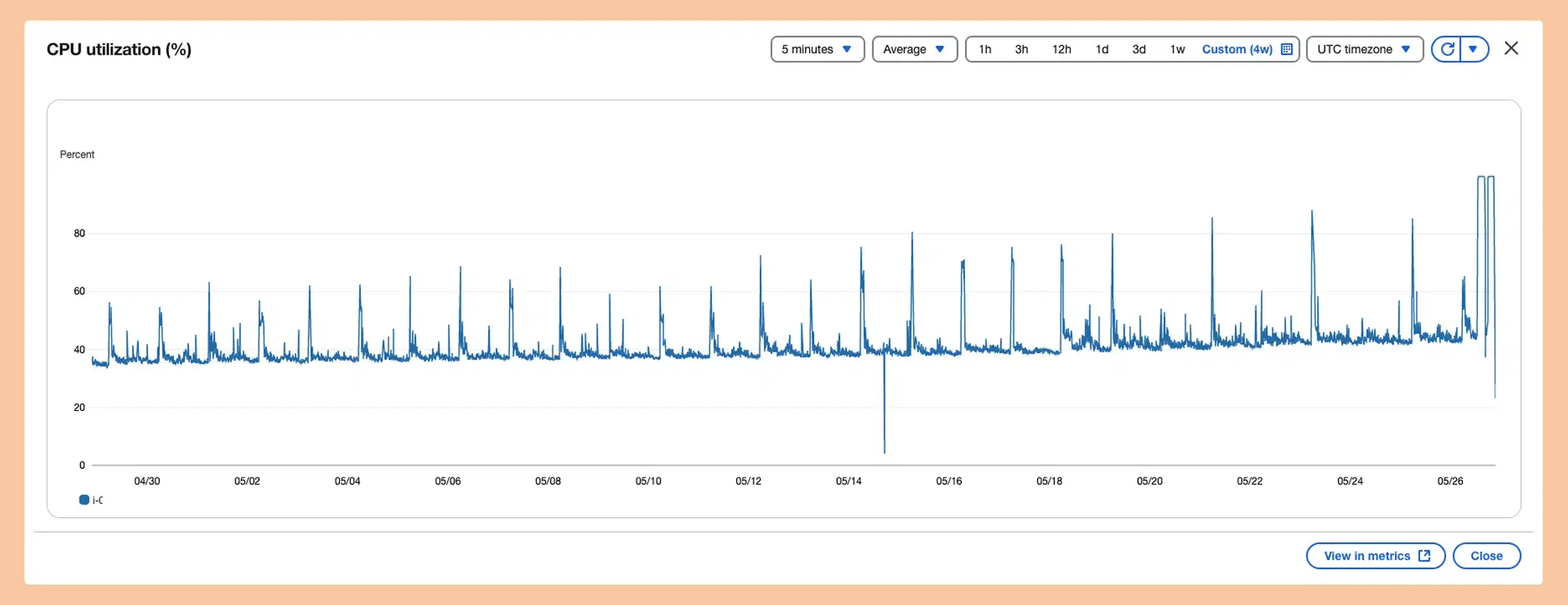
The pattern in the data pointed to three things:
- 01Internal processes, not user traffic: the load stayed high even when nobody was using the app.
- 02Identical, regular CPU spikes: these suggested timed tasks.
- 03A repeating load pattern: something was running every minute.
The Root Cause: 25 Cron Jobs Running Every Minute
The previous team had built 25 separate cron jobs, all set to run every 60 seconds. They:
- ran heavy, unoptimised database queries
- sent notifications across time zones
- had no batching and no checks
- ran even when there was no work to do
It was a textbook example of how poor task scheduling can damage server health. We prepared a detailed issue document and asked the client for three days to repair the scheduling architecture. The client agreed immediately.
Phase 3: Fixing the Foundation in 48 Hours
Within 48 hours, our team:
- rewrote every major cron job
- removed redundant schedules
- added indexing to heavy queries
- introduced queue-based task handling
- grouped notifications by time zone
- added conditional logic, so jobs only run when there is work to do
- removed dead code paths
- split the load where required
- cleaned up the overall scheduling architecture
After deployment, the difference was immediately visible in the monitoring data.
The Result: CPU Usage Fell From 45–60% to Around 5%
Following the optimisation, idle CPU usage dropped from 45–60% to around 5%, a reduction of roughly 90%.
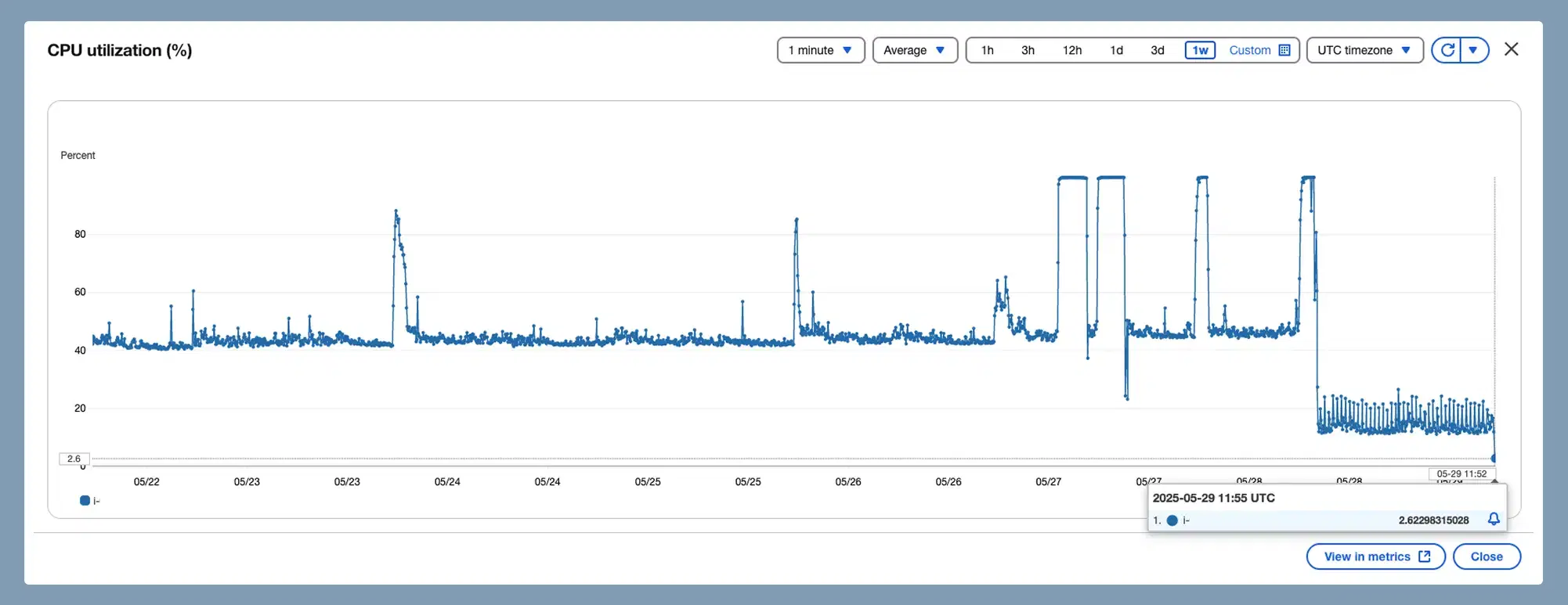
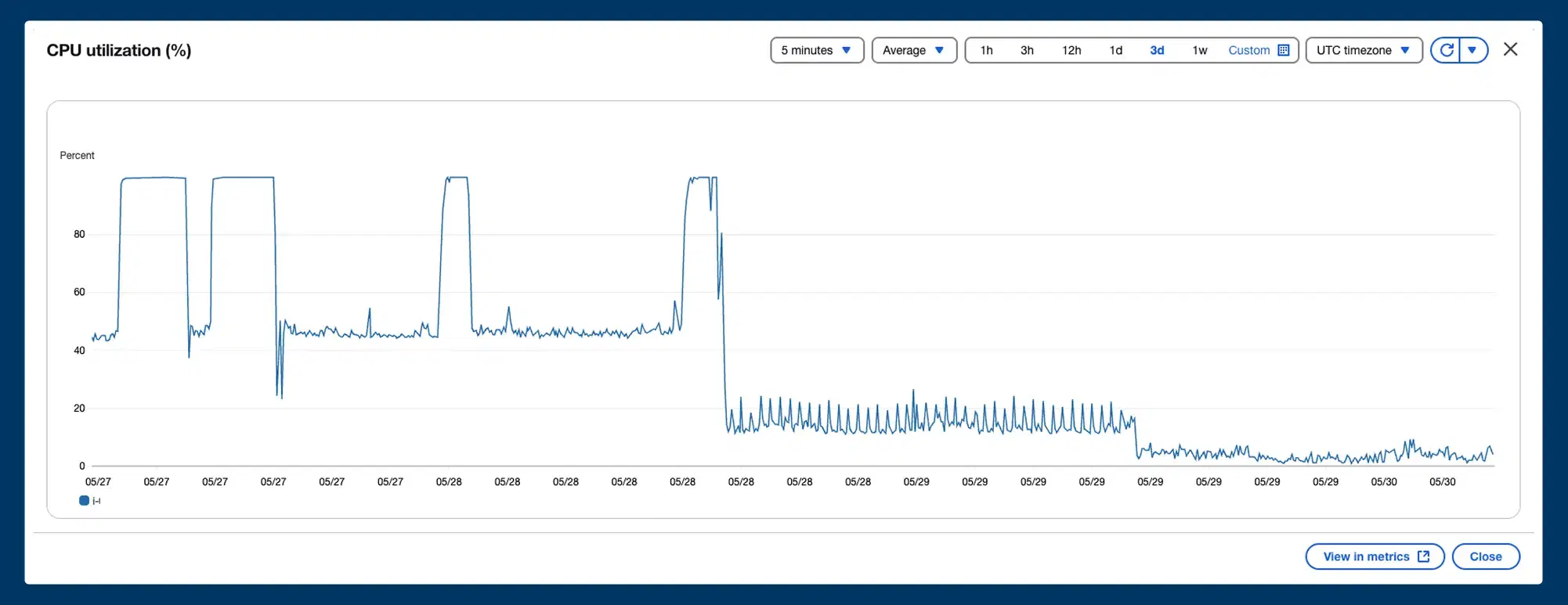
With background load under control, the platform became faster and more predictable, with significant headroom for growth.
Before and After: What Changed
| Area | Before | After |
|---|---|---|
| Idle CPU usage | 45–60% all day, even with no active users | Around 5% |
| Scheduled tasks | 25 cron jobs every 60 seconds, with no batching or checks | Jobs rewritten, redundant schedules removed, queue-based handling and conditional logic added |
| Database queries | Heavy and unoptimised | Indexing added to heavy queries |
| Notifications | Sent across time zones without batching | Grouped by time zone |
| Health and step sync | Step counts, watch and Health Connect data failing | Step and health metric sync corrected, with 30 days of data re-synced |
| Subscriptions | Inaccurate tracking | Accurate subscription state logic |
| Onboarding | Broke depending on the sales channel | A clean onboarding flow |
| Leaderboards and milestones | Unstable | Stable tracking |
What This Project Shows
At BSP Technologies, we treat engineering as ownership, not just task execution. This project reflected that approach in three ways. We found the root cause before patching. We kept communication with the client clear throughout. And we chose long-term fixes over quick workarounds.
For SaaS founders and CTOs, the lessons apply well beyond fitness apps:
- 01Diagnose before you patch. A structured audit turns a list of symptoms into a plan.
- 02Watch your idle load. High CPU usage when no users are active almost always points to background processes, not traffic.
- 03Treat scheduled jobs as architecture. Cron jobs that run too often, without checks or batching, can quietly consume a server.
- 04Fix the data, not just the code. Re-syncing historical data protects user trust after a bug fix.
- 05Stabilise before you scale. If your product is growing but stability isn't keeping up, more developers won't fix it. Better architectural decisions will.
If you are choosing a partner for this kind of work, our guide on how to choose the right software development company covers the questions to ask. Our article What is Product Engineering? explains how ongoing engineering differs from one-off development.
Conclusion
A few hidden issues can quietly undermine user trust, and good engineering can turn a product around. This fitness app did not need more developers. It needed a structured diagnosis, the right architectural decisions and a team willing to take ownership of the outcome.
At BSP Technologies, we specialise in rescuing, restructuring and scaling digital products across industries.
Is your product facing performance issues, operational bottlenecks or scalability challenges?
Schedule a free consultation with BSP Technologies, and we will help you find the root cause and plan a fix that lasts.
Schedule a Free ConsultationFrequently Asked Questions
High CPU usage with no active users usually comes from background processes rather than traffic. Common causes include scheduled cron jobs, polling tasks, unoptimised queries and stuck processes. In this case, 25 cron jobs running every minute kept CPU usage between 45% and 60% all day.
Start by auditing every scheduled job and removing redundant ones. Make each job run only when there is work to do, batch related tasks, and move heavy work into queues. Then index the slow queries the jobs depend on. In this project, these changes reduced idle CPU usage from 45–60% to around 5%.
Often, yes. In this project, the app was not rebuilt. The team fixed the core functional failures in one production update, then rewrote the scheduling architecture in 48 hours. A thorough technical audit shows whether targeted fixes are enough or whether larger changes are needed.
It depends on the cause. In this project, the technical audit mapped the root causes within the first month, and the core functional fixes followed in one production release. Once the cron job problem was identified, the scheduling fixes took 48 hours. Clear diagnosis is usually what makes fast fixes possible.
Consider outside help when core features fail repeatedly, data becomes unreliable, or server costs and load keep rising without explanation. A new team should start with a full technical audit rather than quick patches, so the real causes are fixed instead of the symptoms.